


[2021] MD-100 by Windows 10 Actual Free Exam Practice Test
Free Windows 10 MD-100 Exam Question
Career opportunities
Understanding the Microsoft MD-100 exam content is critical to your success. This means that if you manage to deal with this test, fulfill all the requirements, and obtain the certification, you will be able to get a whole load of benefits. This path grants you a high salary, possible promotion, and respect from your colleagues. Thus, you can land one of the following positions:
- IT Systems/Desktop Administrator;
- Desktop Administrator;
- Desktop Support Administrator.
- Windows Server Administrator;
- Technology Integration Specialist;
- Network Desktop Administrator;
- Computer Systems Analyst;
This certification track leads you to a good salary as well. If you possess this associate-level certificate, you can earn from about $50,000 to $105,000 per year. Your paycheck depends on the company you choose, your hands-on experience, and your ability to use the skills learned wisely.
Additionally, you will get better recognition so that both your employer and your colleagues respect your dedication to work and your skills to perform the needed tasks. This is simply because the certificate shows your true potential and the effort you put into the certification process. Therefore, in most cases, those specialists who are certified are in high demand among the list of the potential candidates where there are the non-certified individuals as well. Indeed, being a holder of the popular Microsoft certificate is the option that a lot of IT professionals opt for.
NEW QUESTION 124
You have several computers that run Windows 10. The computers are in a workgroup.
You need to prevent users from using Microsoft Store apps on their computer.
What are two possible ways to achieve the goal? Each correct answer presents part of the solution.
NOTE: Each correct selection is worth one point.
- A. From Security Settings in the local Group Policy, configure Security Options.
- B. From Security Settings in the local Group Policy, configure Software Restriction Policies.
- C. From Security Settings in the local Group Policy, configure Application Control Policies.
- D. From Administrative Templates in the local Group Policy, configure the Store settings.
Answer: C,D
Explanation:
References:
https://www.techrepublic.com/article/how-to-manage-your-organizations-microsoft-store-group-policy/
NEW QUESTION 125
You have a computer that runs Windows 10.
From the Settings app, you view the connection properties shown in the following exhibit.
Use the drop-down menus to select the answer choice that completes each statement based on the information presented in the graphic.
NOTE: Each correct selection is worth one point.
Answer:
Explanation:
Explanation
NEW QUESTION 126
You have several computers that run Windows 10. The computers are in a workgroup and have BitLocker Drive Encryption (BitLocker) enabled.
You join the computers to Microsoft Azure Active Directory (Azure AD).
You need to ensure that you can recover the BitLocker recovery key for the computers from Azure AD.
What should you do first?
- A. Disable the TMP chip.
- B. Suspend BitLocker.
- C. Add a BitLocker key protector.
- D. Disable BitLocker.
Answer: C
Explanation:
Explanation
References:
https://docs.microsoft.com/en-us/windows/security/information-protection/bitlocker/prepare-your-organization-
NEW QUESTION 127
You are troubleshooting Windows 10 updates that fail to install on a computer that runs Windows 10.
You delete the contents of the SoftwareDistribution folder.
You need to delete the signatures of the Windows Update packages.
Which folder should you delete?
- A. %systemroot%\WinSxS
- B. %systemdrive%\System Volume Information
- C. %systemdrive%\recovery
- D. %systemroot%\system32\catroot2
Answer: D
Explanation:
References:
https://tipsmake.com/how-to-delete-pending-updates-on-windows-10
NEW QUESTION 128
You have a computer that runs Windows 10. The computer contains a folder named C:\ISOs that is shared in ISOs.
You run several commands on the computer as shown in the following exhibit.
Use the drop-down menus to select the answer choice that completes each statement based on the information presented in the graphic.
NOTE: Each correct selection is worth one point.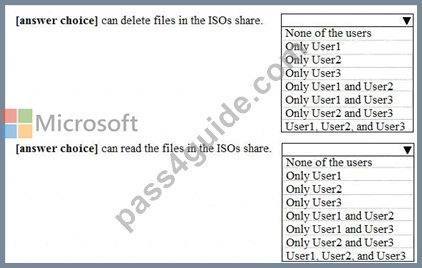
Answer:
Explanation: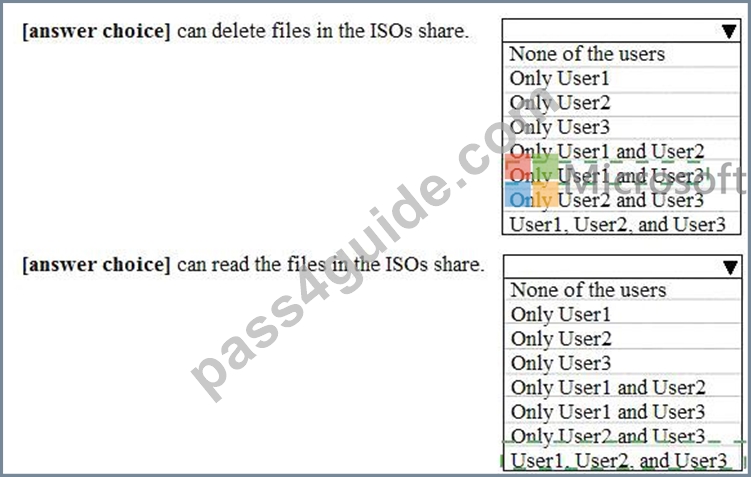
Explanation
NEW QUESTION 129
You have 100 computers that run Windows 10. You have no servers. All the computers are joined to Microsoft Azure Active Directory (Azure AD).
The computers have different update settings, and some computers are configured for manual updates.
You need to configure Windows Update. The solution must meet the following requirements:
* The configuration must be managed from a central location.
* Internet traffic must be minimized.
* Costs must be minimized.
How should you configure Windows Update? To answer, select the appropriate options in the answer area.
NOTE: Each correct selection is worth one point.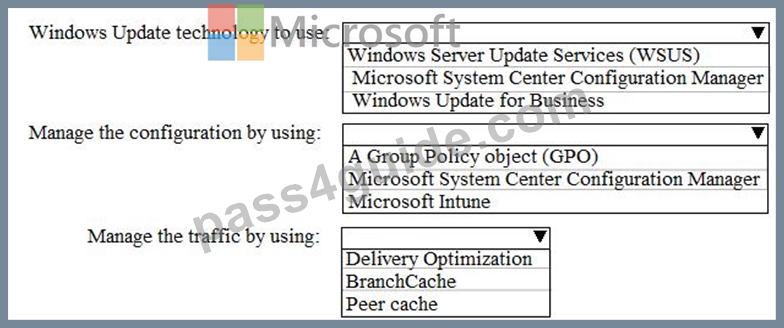
Answer:
Explanation:
Explanation:
References:
https://docs.microsoft.com/en-us/windows/deployment/update/waas-optimize-windows-10-updates
https://docs.microsoft.com/en-us/windows/deployment/update/waas-delivery-optimization
NEW QUESTION 130
A user has a computer that runs Windows 10.
When the user connects the computer to the corporate network, the user cannot access the internal corporate servers. The user can access servers on the Internet.
You run the ipconfig command and receive the following output.
You send a ping request and successfully ping the default gateway, the DNS servers, and the DHCP server.
Which configuration on the computer causes the issue?
- A. the default gateway address
- B. the subnet mask
- C. the IPv4 address
- D. the DNS servers
Answer: D
NEW QUESTION 131
You are a network administrator at your company.
The company uses an application that checks for network connectivity to a server by sending a ping request to the IPv6 address of the server replies, the application loads.
A user cannot open the application.
You manually send the ping request from the computer of the user and the server does not reply. You send the ping request from your computer and the server replies.
You need to ensure that the ping request works from the user's computer.
Which Windows Defender firewall rule is a possible cause of the issue?
- A. File and Printer Sharing (Echo Request ICMPv6-In)
- B. File and Printer Sharing (NB-Datagram-In)
- C. File and Printer Sharing (Echo request ICMPv6-Out)
- D. File and Printer Sharing (NB-Datagram-Out)
Answer: A
Explanation:
References:
https://www.howtogeek.com/howto/windows-vista/allow-pings-icmp-echo-request-through-your-windows-vistafirewall/
NEW QUESTION 132
Please wait while the virtual machine loads. Once loaded, you may proceed to the lab section. This may take a few minutes, and the wait time will not be deducted from your overall test time.
When the Next button is available, click it to access the lab section. In this section, you will perform a set of tasks in a live environment. While most functionality will be available to you as it would be in a live environment, some functionality (e.g., copy and paste, ability to navigate to external websites) will not be possible by design.
Scoring is based on the outcome of performing the tasks stated in the lab. In other words, it doesn't matter how you accomplish the task, if you successfully perform it, you will earn credit for that task.
Labs are not timed separately, and this exam may more than one lab that you must complete. You can use as much time as you would like to complete each lab. But, you should manage your time appropriately to ensure that you are able to complete the lab(s) and all other sections of the exam in the time provided.
Please note that once you submit your work by clicking the Next button within a lab, you will NOT be able to return to the lab.
Username and password
Use the following login credentials as needed:
To enter your password, place your cursor in the Enter password box and click on the password below.
Username: Contoso/Administrator
Password: Passw0rd!
The following information is for technical support purposes only:
Lab Instance: 11145882

You need to ensure that C:\Scripts\Configure.ps1 runs every time a user sign in to Client2.
To complete this task, sign in to the required computer or computers.
Answer:
Explanation:
See explanation below.
Explanation
Go to the Start menu, type "Task Scheduler" and select it from the search results.
Task Scheduler can also be accessed in the Control Panel under Administrative Tools.
In the right side of the Task Scheduler menu, under Actions, select "Create Task."
On the General tab, enter a name and description for the task you're creating. Check the box "Run with highest privileges." Once you have filled out a name and description, click the "Triggers" tab, and then click "New." In this menu, under "Begin the task:" select "At log on." Choose which user you would like the task to run for at log on. For our purposes, Any user.
Configure any of the applicable advanced settings you would like.
After you are finished configuring the new trigger, click OK and then select the "Actions" tab. Click "New" to make a new action.
Choose "Start a program" under the Action menu and then click "Browse" to point to C:\Scripts\Configure.ps1.
Click OK to exit out of the Actions menu. The "Conditions" and "Settings" tabs can be left alone.
Click OK on the Create Task menu, and you are finished.
Reference:
https://www.howtogeek.com/138159/how-to-enable-programs-and-custom-scripts-to-run-at-boot/
NEW QUESTION 133
You have a file named Reg1.reg that contains the following content.
What is the effect of importing the file?
- A. A key named command will be renamed as notepad.exe.
- B. In a key named Notepad, the command value will be set to @="notepad.exe".
- C. In a key named command, the default value will be set to notepad.exe.
Answer: C
NEW QUESTION 134
You have a file named Reg1.reg that contains the following content.
What is the effect of importing the file?
- A. In a key named Notepad, the command value will be set to notepad.exe".
- B. In a key named command, the default value will be set to
- C. A key named command will be renamed as
Answer: B
NEW QUESTION 135
Please wait while the virtual machine loads. Once loaded, you may proceed to the lab section. This may take a few minutes, and the wait time will not be deducted from your overall test time.
When the Next button is available, click it to access the lab section. In this section, you will perform a set of tasks in a live environment. While most functionality will be available to you as it would be in a live environment, some functionality (e.g., copy and paste, ability to navigate to external websites) will not be possible by design.
Scoring is based on the outcome of performing the tasks stated in the lab. In other words, it doesn't matter how you accomplish the task, if you successfully perform it, you will earn credit for that task.
Labs are not timed separately, and this exam may more than one lab that you must complete. You can use as much time as you would like to complete each lab. But, you should manage your time appropriately to ensure that you are able to complete the lab(s) and all other sections of the exam in the time provided.
Please note that once you submit your work by clicking the Next button within a lab, you will NOT be able to return to the lab.
Username and password
Use the following login credentials as needed:
To enter your password, place your cursor in the Enter password box and click on the password below.
Username: Contoso/Administrator
Password: Passw0rd!
The following information is for technical support purposes only:
Lab Instance: 11145882

You need to ensure that all the current and future users in the Active Directory domain can establish Remote Desktop connections to Client1. The solution must use the principle of least privilege.
To complete this task, sign in to the required computer or computers.
Answer:
Explanation:
Step 1. Add Remote Desktop Users to the Remote Desktop Users Group.
Open Server Manager.
From Tools menu, select Active Directory Users and Computers
Double click at your domain on the left and then select Builtin.
Open Remote Desktop Users on the right pane.
At Members tab, click Add.
Type the AD users that you want to give Remote access to the RDS Server and click OK.
After selecting the remote desktop users, click OK again to close the window.
Step 2. Allow the log on through remote desktop Services.
1. Open Group Policy Editor. To do that:
b. Type gpedit.msc and press Enter.
2. In Group Policy Editor navigate to: Computer Configuration > Windows Settings > Security Settings > Local Policies > User Rights Assignment.
3. At the right Pane: double click at Allow log on through Remote Desktop Services.
4. Click Add User or Group.
5. Type remote and then click Check Names.
6. Select the Remote Desktop Users and click OK.
7. Click OK at 'Select users, computers...' window.
8. Finally click OK again and close Group Policy Editor.
Reference:
https://www.wintips.org/fix-to-sign-in-remotely-you-need-the-right-to-sign-in-through-remote-desktop-services-server-2016/
NEW QUESTION 136
You have a workgroup computer named Computer1 that runs Windows 10. Computer1 has the user accounts shown in the following table.
User3, User4, and Administrator sign in and sign out on Computer1. User1 and User2 have never signed in to Computer1.
You are troubleshooting policy issues on Computer1. You sign in to Computer1 as Administrator.
You add the Resultant Set of Policy (RsoP) snap-in to an MMC console.
Which users will be able to sign in on Computer1?
- A. User1, User3, and User4 only
- B. Administrator only
- C. Use1, User2, User3, User4, and Administrator
- D. User3, User4, and Administrator only
Answer: D
Explanation:
The Interactive logon: Number of previous logons to cache (in case domain controller is not available) policy setting determines whether a user can log on to a Windows domain by using cached account information. Logon information for domain accounts can be cached locally so that, if a domain controller cannot be contacted on subsequent logons, a user can still log on.
References:
https://docs.microsoft.com/en-us/windows/security/threat-protection/security-policy-settings/interactive-logon-number-of-previous-logons-to-cache-in-case-domain-controller-is-not-available
NEW QUESTION 137
You are preparing to deploy Windows 10.
You download and install the Windows Assessment and Deployment Kit (Windows ADK).
You need to create a bootable WinPE USB drive.
What should you do first?
- A. Run the MakeWinPEMedia command.
- B. Download and install Windows Configuration Designer.
- C. Run the WPEUcil command.
- D. Download and install the WinPE add-on.
Answer: D
Explanation:
WinPE used to be included in the Windows ADK. However, it is now provided as an add-on so the first step is to download and install the add-on.
References:
https://docs.microsoft.com/en-us/windows-hardware/manufacture/desktop/winpe-create-usb-bootable-drive
https://docs.microsoft.com/en-us/windows-hardware/get-started/adk-install
NEW QUESTION 138
You have a computer named Computer1 that runs Windows 10. Computer1 contains a folder named Data on drive C.
The Advanced Security Settings for the Data folder are shown in the exhibit. (Click the Exhibit tab.)
You share C:\Data as shown in the following table.
User1 is a member of the Users group.
Administrators are assigned Full control NTFS permissions to C:\Data.
For each of the following statements, select Yes if the statement is true. Otherwise, select No.
NOTE: Each correct selection is worth one point.
Answer:
Explanation:
NEW QUESTION 139
Your network contains an Active Directory domain. The domain contains 1,000 computers that run Windows 10.
You discover a known compatibility issue between a feature update and a device driver on the computers.
You need to test the installation of the feature update on a test computer.
Which Windows Update setting should you configure by using a Group Policy Object (GPO)?
- A. Select the target Feature Update version
- B. Disable safeguards for Feature Updates
- C. Automatic Updates detection frequency
- D. Reschedule Automatic Updates scheduled installations
Answer: B
Explanation:
Reference:
https://docs.microsoft.com/en-us/windows/deployment/update/safeguard-opt-out
NEW QUESTION 140
Your network contains an Active Directory domain that contains the objects shown in the following table.
Computer1 contains the shared folders shown in the following table.
The computers have the network configurations shown in the following table.
For each of the following statements, select Yes if the statement is true. Otherwise, select No.
NOTE: Each correct selection is worth one point.
Answer:
Explanation:
NEW QUESTION 141
You have 100 computers that run Windows 10. The computers are in a workgroup.
The computers have a low-bandwidth metered Internet connection.
You need to reduce the amount of Internet bandwidth consumed to download updates.
What should you configure?
- A. BranchCache in distributed cache mode
- B. Background intelligent Transfer Service (BITS)
- C. BranchCache in hosted mode
- D. Delivery Optimization
Answer: D
Explanation:
Explanation/Reference:
References:
https://support.microsoft.com/en-us/help/4468254/windows-update-delivery-optimization-faq
NEW QUESTION 142
You have a computer named Computer1 that runs Windows 10. Computer1 is in a workgroup.
Computer1 contains the folders shown in the following table.
On Computer1, you create the users shown in the following table.
User1 encrypts a file named File1.txt that is in a folder named C:\Folder1.
What is the effect of the configuration? To answer, select the appropriate options in the answer area.
NOTE: Each correct selection is worth one point.
Answer:
Explanation:
Explanation
References:
https://support.microsoft.com/en-za/help/310316/how-permissions-are-handled-when-you-copy-and-move-files-
NEW QUESTION 143
You have 100 computers that run Windows 10. You have no servers. All the computers are joined to Microsoft Azure Active Directory (Azure AD).
The computers have different update settings, and some computers are configured for manual updates.
You need to configure Windows Update. The solution must meet the following requirements:
The configuration must be managed from a central location.
Internet traffic must be minimized.
Costs must be minimized.
How should you configure Windows Update? To answer, select the appropriate options in the answer area.
NOTE: Each correct selection is worth one point.
Answer:
Explanation:
Explanation:
References:
https://docs.microsoft.com/en-us/windows/deployment/update/waas-optimize-windows-10-updates
https://docs.microsoft.com/en-us/windows/deployment/update/waas-delivery-optimization
NEW QUESTION 144
......
Microsoft MD-100 Actual Questions and Braindumps: https://www.pass4guide.com/MD-100-exam-guide-torrent.html
MD-100 dumps & Windows 10 sure practice dumps: https://drive.google.com/open?id=1SSJGsPHmd3Rcige35hBXKGpd3_1EXKua