


Get The Most Updated 156-315.81 Dumps To Check Point Certified Security Expert Certification
CheckPoint Certified 156-315.81 Dumps Questions Valid 156-315.81 Materials
The Check Point Certified Security Expert (CCSE) R81 exam is a comprehensive evaluation of the knowledge, skills, and abilities of security professionals in deploying and managing Check Point Security solutions. 156-315.81 exam covers a wide range of topics, including network security architecture, implementation and management of security policies, user and authentication management, VPN implementation, and monitoring and troubleshooting network security issues. 156-315.81 exam is designed to validate the knowledge and expertise of security professionals in the field of network security.
NEW QUESTION # 245
What are the correct steps upgrading a HA cluster (M1 is active, M2 is passive) using Multi-Version Cluster(MVC)Upgrade?
- A. 1) Enable the MVC mechanism on both cluster members #cphaprob mvc on
2) Upgrade the passive node M2 to R81.10
3) In SmartConsole, change the version of the cluster object
4) Install the Access Control Policy
5) After examine the cluster states upgrade node M1 to R81.10
6) On each Cluster Member, disable the MVC mechanism and Install the Access Control Policy - B. 1) Upgrade the passive node M2 to R81.10
2) Enable the MVC mechanism on the upgraded R81.10 Cluster Member M2 #cphaconf mvc on
3) In SmartConsole, change the version of the cluster object
4) Install the Access Control Policy
5) After examine the cluster states upgrade node M1 to R81.10
6) On each Cluster Member, disable the MVC mechanism and Install the Access Control Policy upgrade the passive node M2 to R81.10 - C. 1) Enable the MVC mechanism on both cluster members #cphaprob mvc on
2) Upgrade the passive node M2 to R81.10
3) In SmartConsole, change the version of the cluster object
4) Install the Access Control Policy and make sure that the installation will not stop if installation on one cluster member fails
5) After examine the cluster states upgrade node M1 to R81.10
6) On each Cluster Member, disable the MVC mechanism - D. 1) In SmartConsole, change the version of the cluster object
2) Upgrade the passive node M2 to R81.10
3) Enable the MVC mechanism on the upgraded R81.10 Cluster Member M2 #cphaconf mvc on
4) Install the Access Control Policy and make sure that the installation will not stop if installation on one cluster member fails
5) After examine the cluster states upgrade node M1 to R81.10
6) On each Cluster Member, disable the MVC mechanism and Install the Access Control Policy SmartConsole, change the version of the cluster object
Answer: D
Explanation:
Explanation
https://sc1.checkpoint.com/documents/R81/WebAdminGuides/EN/CP_R81_Installation_and_Upgrade_Guide/T
NEW QUESTION # 246
You have used the SmartEvent GUI to create a custom Event policy. What is the best way to display the correlated Events generated by SmartEvent Policies?
- A. Select the Events tab in the SmartEvent GUI or use the Events tab in the SmartView web interface.
- B. In the SmartConsole / Logs & Monitor -> open a new Tab and select External Apps / SmartEvent.
- C. In the SmartConsole / Logs & Monitor --> open the Logs View and use type:Correlated as query filter.
- D. Open SmartView Monitor and select the SmartEvent Window from the main menu.
Answer: B
Explanation:
Explanation
The best way to display the correlated events generated by SmartEvent policies is to open a new tab in the SmartConsole / Logs & Monitor and select External Apps / SmartEvent. This will launch the SmartEvent GUI, which provides a comprehensive view of the network security events, including charts, reports, and timelines. The SmartEvent GUI can also be accessed from a web browser using the SmartView web interface1. References: Check Point R81 SmartEvent Administration Guide
NEW QUESTION # 247
Using ClusterXL, what statement is true about the Sticky Decision Function?
- A. Can only be changed for Load Sharing implementations
- B. Is only relevant when using SecureXL
- C. Is configured using cpconfig
- D. All connections are processed and synchronized by the pivot
Answer: A
NEW QUESTION # 248
How would you deploy TE250X Check Point appliance just for email traffic and in-line mode without a Check Point Security Gateway?
- A. You can utilize only Check Point Cloud Services for this scenario.
- B. Install appliance TE250X on SpanPort on LAN switch in MTA mode.
- C. It is not possible, always Check Point SGW is needed to forward emails to SandBlast appliance.
- D. Install appliance TE250X in standalone mode and setup MTA.
Answer: A
Explanation:
Explanation
To deploy a TE250X Check Point appliance just for email traffic and in-line mode without a Check Point Security Gateway, you can utilize Check Point Cloud Services. In this scenario, you can leverage cloud-based email security services provided by Check Point without the need for an on-premises Security Gateway.
Option C correctly states that you can use only Check Point Cloud Services for this scenario, making it the verified answer.
References: Check Point Certified Security Expert (CCSE) R81 documentation and learning resources.
NEW QUESTION # 249
What is the purpose of the CPCA process?
- A. Sending and receiving logs.
- B. Monitoring the status of processes.
- C. Generating and modifying certificates.
- D. Communication between GUI clients and the SmartCenter server.
Answer: C
Explanation:
Explanation
The purpose of the CPCA process is to generate and modify certificates for Check Point products and features. CPCA stands for Check Point Certificate Authority and it is responsible for creating and managing certificates for internal communication between Check Point components, such as Security Gateways, Security Management Servers, SmartConsole clients, and OPSEC applications. CPCA also supports external certificate authorities and can import and export certificates from other sources.
NEW QUESTION # 250
What is required for a certificate-based VPN tunnel between two gateways with separate management systems?
- A. Mutually Trusted Certificate Authorities
- B. Shared User Certificates
- C. Shared Secret Passwords
- D. Unique Passwords
Answer: A
NEW QUESTION # 251
What are the available options for downloading Check Point hotfixes in Gala WebUI (CPUSE)?
- A. Manually, Automatic, Disabled
- B. Manually, Scheduled, Automatic
- C. Manually, Scheduled, Disabled
- D. Manually, Scheduled, Enabled
Answer: B
Explanation:
Explanation
The available options for downloading Check Point hotfixes in Gaia WebUI (CPUSE) are Manually, Scheduled, and Automatic. These options can be configured in the CPUSE Settings tab of the Gaia Portal. The Manual option lets you download hotfixes manually from the Check Point Cloud or a local Deployment Agent when you need them. The Scheduled option lets you download hotfixes automatically at a specified time interval (daily, weekly, or monthly). The Automatic option lets you download hotfixes automatically as soon as they are available.
Reference: https://sc1.checkpoint.com/documents/R77/CP_R77_Gaia_AdminWebAdminGuide/ html_frameset.htm?topic=documents/R77/CP_R77_Gaia_AdminWebAdminGuide/112109
NEW QUESTION # 252
What does it mean if Deyra sees the gateway status? (Choose the BEST answer.)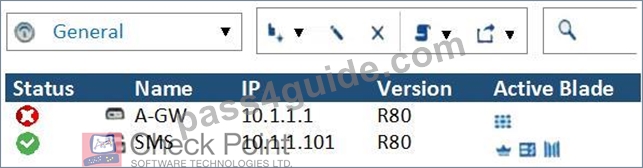
- A. There is a blade reporting a problem.
- B. Security Gateway's MGNT NIC card is disconnected.
- C. VPN software blade is reporting a malfunction.
- D. SmartCenter Server cannot reach this Security Gateway.
Answer: A
Explanation:
Explanation
If Deyra sees the gateway status as shown in the image, it means that there is a blade reporting a problem. The red exclamation mark indicates that one or more blades on the gateway have an issue that needs attention. The issue could be related to configuration, license, policy, or other factors. Deyra can hover over the icon to see more details about the problem. References: Training & Certification | Check Point Software, New Courses and Certificates for R81.10 - Check Point CheckMates
NEW QUESTION # 253
To fully enable Dynamic Dispatcher on a Security Gateway:
- A. Using cpconfig, update the Dynamic Dispatcher value to "full" under the CoreXL menu.
- B. Edit/proc/interrupts to include multik set_mode 1 at the bottom of the file, save, and reboot.
- C. run fw multik set_mode 1 in Expert mode and then reboot.
- D. run fw ctl multik set_mode 9 in Expert mode and then Reboot.
Answer: D
Explanation:
Explanation
To fully enable Dynamic Dispatcher on a Security Gateway, you need to run the following command in Expert mode then reboot:
This command sets the multi-core mode to 9, which means that Dynamic Dispatcher is enabled without Firewall Priority Queues. Dynamic Dispatcher is a feature that optimizes the performance of Security Gateways with multiple CPU cores by dynamically allocating traffic to different cores based on their load and priority. Dynamic Dispatcher can improve the throughput and scalability of the Security Gateway, especially for traffic that is not accelerated by SecureXL. The other commands are not valid or do not enable Dynamic Dispatcher. References: R81 Performance Tuning Administration Guide
NEW QUESTION # 254
Which components allow you to reset a VPN tunnel?
- A. delete vpn ike sa or vpn she11 command
- B. vpn tunnelutil or delete vpn ike sa command
- C. vpn tu command or SmartView monitor
- D. SmartView monitor only
Answer: D
NEW QUESTION # 255
Which Check Point software blades could be enforced under Threat Prevention profile using Check Point R81.20 SmartConsole application?
- A. IPS, Anti-Bot, URL Filtering, Application Control, Threat Emulation.
- B. Firewall, IPS, Threat Emulation, Application Control.
- C. Firewall, IPS, Anti-Bot, Anti-Virus, Threat Emulation.
- D. IPS, Anti-Bot, Anti-Virus, Threat Emulation, Threat Extraction.
Answer: D
Explanation:
Explanation
The Threat Prevention profile in Check Point R81.20 SmartConsole application allows you to enforce the following software blades: IPS, Anti-Bot, Anti-Virus, Threat Emulation, and Threat Extraction. These software blades provide comprehensive protection against various types of threats, such as network attacks, malware, ransomware, phishing, and zero-day exploits. You can configure the profile settings for each software blade, such as the action to take, the protection scope, and the exceptions. References: Check Point Security Expert R81 Course, Threat Prevention Administration Guide
NEW QUESTION # 256
After the initial installation on Check Point appliance, you notice that the Management-interface and default gateway are incorrect.
Which commands could you use to set the IP to 192.168.80.200/24 and default gateway to 192.168.80.1.
- A. set interface Mgmt ipv4-address 192.168.80.200 mask-length 24set static-route default nexthop gateway address 192.168.80.1 onsave config
- B. set interface Mgmt ipv4-address 192.168.80.200 255.255.255.0add static-route 0.0.0.0. 0.0.0.0 gw 192.168.80.1 onsave config
- C. set interface Mgmt ipv4-address 192.168.80.200 mask-length 24add static-route default nexthop gateway address 192.168.80.1 onsave config
- D. set interface Mgmt ipv4-address 192.168.80.200 255.255.255.0set static-route 0.0.0.0. 0.0.0.0 gw 192.168.80.1 onsave config
Answer: A
NEW QUESTION # 257
What cloud-based SandBlast Mobile application is used to register new devices and users?
- A. Management Dashboard
- B. Check Point Gateway
- C. Check Point Protect Application
- D. Behavior Risk Engine
Answer: B
Explanation:
Explanation
The cloud-based SandBlast Mobile application that is used to register new devices and users is Check Point Gateway. Check Point Gateway is a web portal that allows administrators to enroll devices and users into the SandBlast Mobile service, which is a cloud-based solution that protects mobile devices from advanced threats.
Check Point Gateway also allows administrators to configure policies, monitor device status, and generate reports for SandBlast Mobile.
NEW QUESTION # 258
On the following picture an administrator configures Identity Awareness: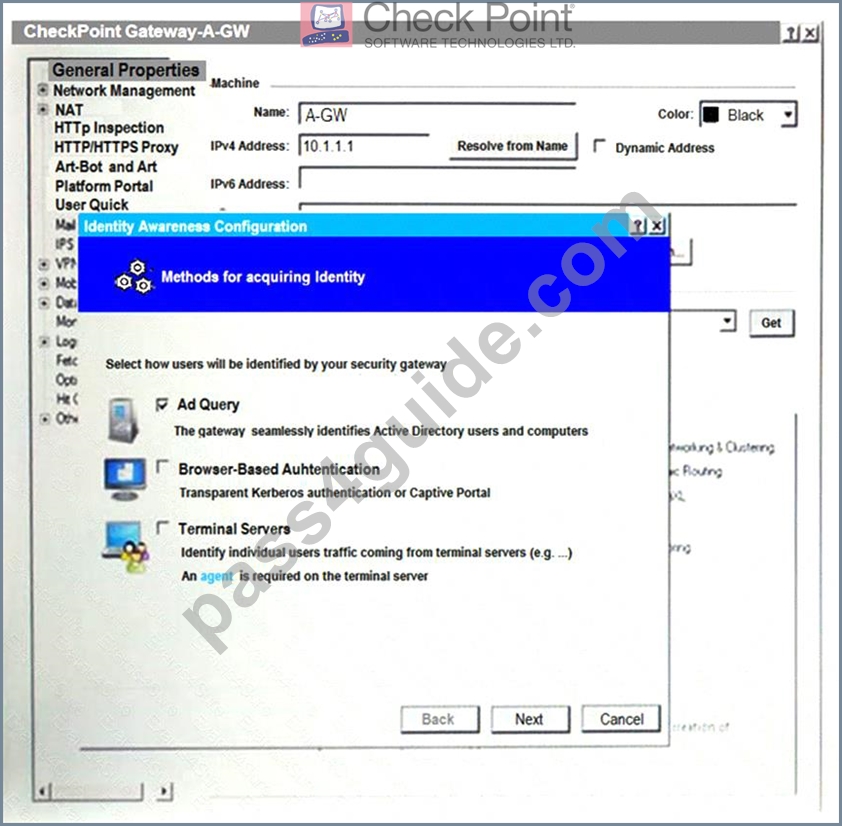
After clicking "Next" the above configuration is supported by:
- A. The ports 443 or 80 what will be used by Browser-Based and configured Authentication.
- B. Obligatory usage of Captive Portal.
- C. Based on Active Directory integration which allows the Security Gateway to correlate Active Directory users and machines to IP addresses in a method that is completely transparent to the user.
- D. Kerberos SSO which will be working for Active Directory integration
Answer: C
Explanation:
Explanation
After clicking "Next", the above configuration is supported by Active Directory integration which allows the Security Gateway to correlate Active Directory users and machines to IP addresses in a method that is completely transparent to the user. This is a feature of Identity Awareness that allows the Security Gateway to identify users and machines on the network and enforce security policies based on their identity. The administrator can configure Identity Awareness to use various methods for acquiring identity, including Active Directory integration, browser-based authentication, terminal servers, and transparent authentication1.
References: Check Point Resource Library, page 3.
NEW QUESTION # 259
What is the most ideal Synchronization Status for Security Management Server High Availability deployment?
- A. Never been synchronized
- B. Synchronized
- C. Collision
- D. Lagging
Answer: B
NEW QUESTION # 260
What is the responsibility of SOLR process on R81.10 management server?
- A. It generates indexes of data written to the database
- B. Communication between SmartConsole applications and the Security Management Server
- C. Validating all data before it's written into the database
- D. Writing all information into the database
Answer: A
Explanation:
Explanation
The responsibility of SOLR process on R81.10 management server is to generate indexes of data written to the database. SOLR is an open source search platform that provides fast and scalable indexing and querying capabilities. SOLR is used by the R81.10 management server to index data such as logs, objects, policies, tasks, and events, and to enable quick and efficient searches on this data by SmartConsole and SmartView applications.
NEW QUESTION # 261
What is the valid range for VRID value in VRRP configuration?
- A. 0 - 255
- B. 1 - 255
- C. 0 - 254
- D. 1 - 254
Answer: B
Explanation:
Virtual Router ID - Enter a unique ID number for this virtual router. The range of valid values is 1 to 255.
NEW QUESTION # 262
Which of the following is NOT a component of Check Point Capsule?
- A. Capsule Enterprise
- B. Capsule Docs
- C. Capsule Workspace
- D. Capsule Cloud
Answer: A
NEW QUESTION # 263
Identify the API that is not supported by Check Point currently.
- A. Open REST API
- B. OPSEC SDK
- C. Identity Awareness Web Services API
- D. R81 Management API-
Answer: A
Explanation:
Explanation
Check Point currently supports four types of APIs: R81 Management API, Identity Awareness Web Services API, OPSEC SDK, and Gaia REST API. The Open REST API is not a valid option. References: Check Point APIs
NEW QUESTION # 264
The Check Point history feature in R81 provides the following:
- A. View install changes and install specific version
- B. Policy Installation Date only
- C. Policy Installation Date, view install changes and install specific version
- D. View install changes
Answer: B
NEW QUESTION # 265
......
CheckPoint 156-315.81 (Check Point Certified Security Expert R81) Certification Exam is a highly sought after certification for professionals in the cybersecurity field. Check Point Certified Security Expert R81 certification is designed to test an individual's knowledge of Check Point's Network Security solutions and their ability to implement them effectively.
Check Point Certified Security Expert R81 (156-315.81) is a certification exam that is designed for IT security professionals who want to validate their expertise in implementing, configuring, and managing Check Point Security Gateway and Management Software Blades systems. 156-315.81 exam is intended for individuals who already have a strong foundation in networking and security concepts and are seeking to advance their knowledge and skills in Check Point technologies.
156-315.81 Premium PDF & Test Engine Files with 616 Questions & Answers: https://www.pass4guide.com/156-315.81-exam-guide-torrent.html
Current 156-315.81 Exam Dumps [2024] Complete CheckPoint Exam Smoothly: https://drive.google.com/open?id=1B0Y0oX-v4YZdpgsrxC98yGhvHckf_vRr